
DIGIPLATFORM
Digiplatform is a SaaS product that is designed and customised to your needs and requirements.

The main features of the product are
User management
Create your own users according to your requirements.

Document management
Storage and control of business and management system documents, including high-level documents, company policies, procedures, and process flow charts.

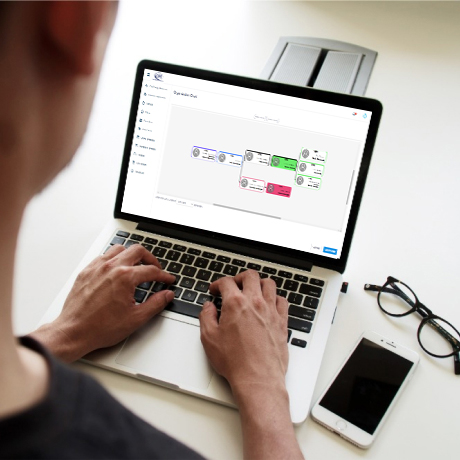
Organisation charts
Management of business organisation charts and related responsibilities and authorities for each role.
Reporting and escalation
Formalising the reporting and escalation lines within the business structure.

Online templates
Developing online templates for internal and external use.

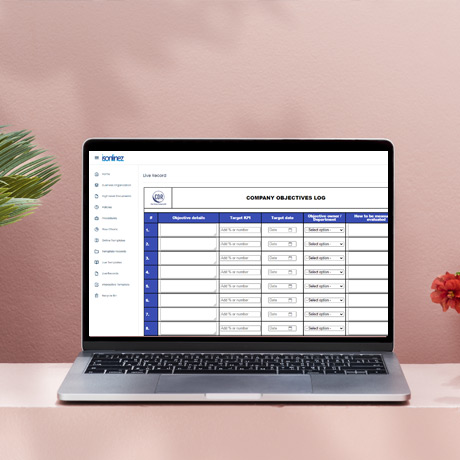
Live templates
Developing live templates which create editable digital records that can be updated as required by selected authorised users.
PDF conversion
Automatic PDF conversion of records generated from the use of online and live templates.

Share records
Ability to share PDF records internally and externally directly from the platform.

Organised Records Infrastructure
An organised record-keeping infrastructure that is backed up on a trusted server.

Customised record environments
Ability to create customised record environment pages with controlled user access management, i.e., you can create department, project-related, product-related, and confidential record pages that only users selected by you can access.

Digital signature
Authorise internal documents digitally.

Internal Task Allocation
Allocate tasks to internal users and notify them of the approaching deadline.

How it works
Video of online templates, live templates and records editing, and back-end administration support.

Experience the Difference! Book a Personalised Demo Today

FAQs
Navigate through our FAQ section to swiftly find solutions, insights, and essential information about Digiplatform.
Digiplatform is suitable for any business irrespective of its size or industry of operation.
100%. We will work with you to create your custom online and live templates to meet your requirements and expectations.
Only users within your organisation that have been authorised by the prime users.
You can submit a job ticket, which is received and handled by our back-end administration team usually within 24 hours.
Simply go to the Home page and see the status of your job ticket. Most tickets are closed fairly quickly, depending on the complexity of the request.
It is very easy to navigate through and use your Digiplatform, but our Demo page has a lot of useful videos that will guide you through the different features of your platform.
Three types of users can access your platform. These are Prime users, Admin users, and Platform users.
Prime users can create Admin and Platform users as well as withdraw their access. They can also request the creation of new record environments (e.g., departments, project-specific, product-specific records, etc.). Prime users can edit live records, delete records, and retrieve them from the recycle bin.
Admin users can create Platform users as well as withdraw their access. Admin users can edit live records, delete records, and retrieve them from the recycle bin.
Only Prime users can request access for new users.
You need to request a new job ticket and provide the information required. Then, our back-end administrators will set it out for you, and your new organisation chart will appear on the platform along with the roles, responsibilities, and authorities for each employee.
Similarly, you request the requirement via the job ticketing system, and we will do it for you.
The process is very simple. You raise a job ticket on the platform, and we upload your documents online. You can add your high-level documents, company policies, procedures and flow charts. Digiplatform is ideal for all types of document management systems that need to meet the requirements of different international standards such as ISO 9001 (Quality), ISO 14001 (Environment), ISO 27001 (Information Security), ISO 45001 (Health & Safety), etc.
We are the only SaaS provider that creates everything for you. We can convert any template that you currently have into an online template that you can access and use online. You create a job ticket and upload your existing templates, and our back-end administrators will create your new online template.
Again, you just create a job ticket. We have access to thousands of templates and the ability to create almost any template that you need.
Again, you just create a job ticket. We have access to thousands of templates and the ability to create almost any template that you need.
All records generated from your online templates go to your Records page. Digiplatform automatically converts your online templates into PDF records. We have a unique record-keeping structure where all your records are stored according to the name of your templates.
Each record can be emailed to internal and external email accounts (unlimited accounts can be used). Some templates can be generated to email the record at the time of submission.
You can create your record environments where records for that environment can be stored and accessed by a selection of users of your choice. For example, you can use the Purchase order template and store it in the project of your choice, which can be accessed only by the users who work on that project.
The prime users can request the creation of different record environments that separate department, project-specific, and product-specific records. When new users are created, they will be given access to the record environments that the prime user wants them to access. Existing users can also be controlled and added or removed from existing record environments. All users are controlled and managed by prime users.
Live templates allow you to create records that can later be edited and updated. Only Prime and Admin users can edit live records. Platform users are allowed to view and share the PDF version of the live records. Live templates are ideal for managing information that requires regular updates, such as customer invoice ledger or project spent reports, etc.
The Digiplatform's subscription is based on the number of users who need to access the platform. Whether you are a two or fifty employees business, the platform's features are the same. Digiplatform's subscription offers ongoing back-end administration support and a lifetime update/upgrade policy (i.e., we will not charge you extra for the introduction of new features or an upgrade to existing features).
Yes, all documents, online templates, live templates, and digital records can be searched and found easily on the platform.
All users can allocate tasks to existing internal users. They need to create a new internal job ticket, explain the details of the required task and the target completion date (deadline), and allocate the task to the relevant user. The responsible task user will receive an email and a reminder email 24 hours before the selected deadline. When the task is completed, the user can update the job ticket and change it to ‘Completed’.
Our trusted
clients


Client Testimonials
Tony Shrubsole
Director, Clad Design Resource Ltd.

Trending
See what’s next! News, Blog, Demos, Social Media and more...